Testing. Testing. 123.
Before beginning on official MSPM curriculum, I’m documenting my deep dive into building and analyzing the effectiveness of a search feature because it’s relevant to a project I’m working on. Below is documentation of everything that I’ve found of interest. These are my sources of information and inspiration:
- Product Podcast episode called “How to Build Search Products by LinkedIn Product Manager”
- Medium article called “Search Redesign: Defining Search Patterns and Models”
- Medium article called “Measuring Search Effectiveness”
Find full MLA citations at the bottom
First, we must establish that a search feature is a mechanism to enable information-seeking, and we can measure the success of the search feature by measuring how effectively it supports the information-seeking process (Tunkelang). To do this, we must categorize the type of information-seeking that a user is doing.
Options for types of searches include navigational searches and exploratory or informational searches. In navigational searches, users know exactly what they’re looking for and are trying to get there as quickly as possible. In exploratory (or informational) searches, users only have a general idea of what they’re looking for and might use filters to find something of use. And what they “need” might possibly (likely) be satisfied by more than one result. If a user is confirming that what they’re looking for is not in the search body, I’m assuming that they might use exploratory searching and filter down the results to show all results that meet all criteria, with no other results, in order to most effectively rule out the original thing’s existence. A note that I also saw a category called transactional searches in which people are intending to make a specific transaction, but that one isn’t relevant to my personal use case so we’ll ignore that one.
With that in mind, there are some other key dimensions of a user’s intent that dictate search design. We’re talking:
- how serious are they about this search (intent strength)
- do they know exactly what they’re searching for? (specificity)
- how much effort are they willing to put in (effort)
- how much control do they need to have over the search (control)
- how carefully are they considering results (consideration)
I’m thinking that these would impact design decisions like how wide to cast the net of possible results, how to sort and present the results (eg. how much information should you show on the search results page), and whether you would give the option to filter results.
Next are ways to measure the effectiveness of the search. First – -recall and precision. These are key. Actually, let’s throw a good old recall-precision matrix in here for kicks (I drew this one in hopes that I’d once and for all memorize it):
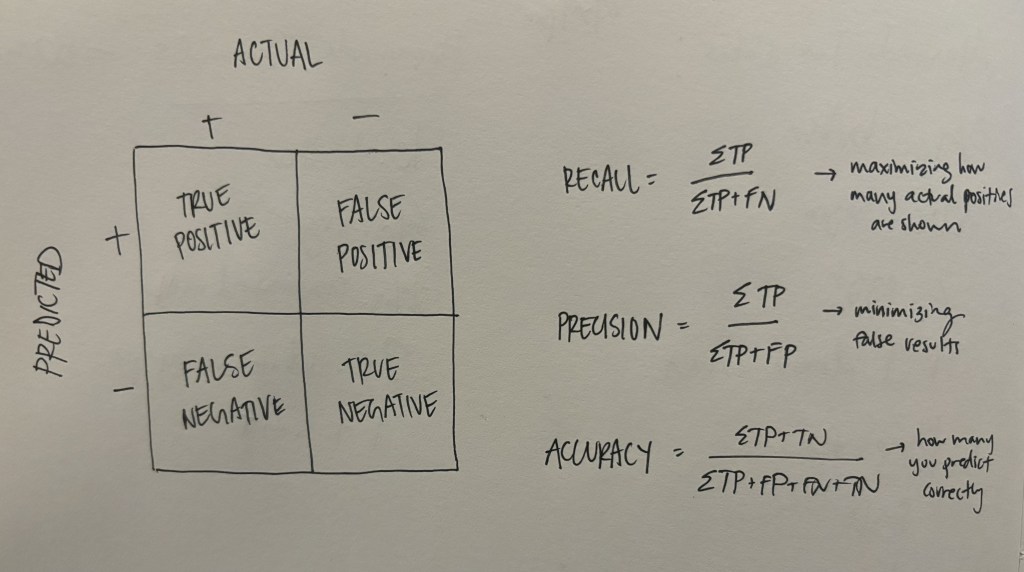
Put simply, high recall measures the “fraction of all relevant results returned,” and precision measures the “fraction of returned results that are relevant” (Tunkelang). Unfortunately people are bad at searching, so as designers we have to get creative about maintaining high recall (high precision is comparatively straight forward, or possibly less important, I think). Take synonyms, for example. Most searches will function more effectively if results include results with words synonymous or semantically similar to the searched words. Typos? Done. Long story short, ML is probably going to be your friend here.
And the last fundamental thing I looked into, which is also probably my own biggest challenge: analytical metrics. On the podcast, the speaker emphasized that metrics, particularly the north star metric, for a search product are not super straightforward. The following are different metrics suggested in the podcasts and articles:
- Success of a Search Session. In LinkedIn’s world, a “search session” = click into search bar until next click into search bar (not perfect). “Success” = clicking on a result (aka finding something of interest), sometimes taking into account time spent in the destination. This measures whether a user has found something of interest based on a single query, but not necessarily that they found the one thing they were looking for (if there was one). Aka, this is probably better for measuring success of exploratory-leaning searches. A note here that in the article on measuring search effectiveness, a session was defined as an entire distinct period of time spent on the search feature, often including many search queries (some of which might be related).
- ROI. Returns are measured by clicks and conversions, while investment is measured by things like time spent in session and number of queries by a single user (Tunkelang). I like this one because it doesn’t make any sort of assumption that we understand the exact intent behind specific actions but rather seeks to generalize the overall success of the search feature’s ability to provide results of interest.
- Growth of Distinct Users Over Time. Easy. (and if you’re trying to get users to convert from somewhere else, also look at the decline of users there).
- Time to Click on First Result. Kind of like the first one, but measures how good your search is at organizing and presenting relevant results.
Also, ideally search product designers combine those with user testing and asking users to grade the relevancy of results based on pre-determined search queries. However, a specific case I want to think about is a search feature in which there is no “click” for a specific search match (all result information is contained on the search results page). To look at it more systematically, I pulled some common “search patterns” from a Medium article which pulled them from some books you can find listed in the article. The following are a few possible behavior patterns that a user might commonly display:
“Quit”
Search. See results. Quit.
Mind reading: Either a user found what they were looking for on the results page without clicking, or they found the results so bad that they gave up.
Question: Should you try to design a UI that forces users to click in order to get whatever information they need to consider the search a success to avoid this metric-confusion?
“Narrow”
Search. See results. Narrow down results using filter/advanced search.
Mind reading: A user didn’t find what they were looking for right away but thought they were on the right track. A combo of search – filter – click on a result could be a good sign here.
Note: This seems like it could be indicative of exploratory or navigational searches. Aka, filters are likely going to be a good idea no matter what.
“Berry Picking”
Search. Click a result. Read it. Go back and search with a new query refined based on the new information. Click a result. Potentially repeat.
Mind reading: They didn’t really know what they were looking for originally (and/or how to find it), and they’re using related results to narrow it down.
Question: Should that first search bar to search bar session be considered a failure? Tracking a multi-query session seems more effective here.
So in the case of the “Quit” pattern, a user could experience a successful search without ever clicking on a result. Curious. I’m thinking that the best way to account for this is by talking to users to identify whether this is a possible pattern for your particular search feature. Then, if you want to capture whether it was a success, figure out if they are then conducting subsequent, related queries, indicating that they didn’t get the information they needed (this would be verging on “Berry Picking”). Or, if you don’t want to deal with figuring out those analytics, determine what information users are finding without clicks that makes them determine that the search was a success, then change the UI so that they have to click in order to get that information.
Overall, takeaways from this research are that because of the varied user motivations and behaviors, search feature metrics are very imperfect, but embracing their imperfection could be the key. Thanks for reading.
Sources consulted during this deep dive (in MLA obviously because we’re acting like academics here):
“How to Build Search Products by LinkedIn Product Manager.” The Product Podcast. Spotify. October 17, 2017.
Tsech, Nadya. “Search Redesign: Defining Search Patterns and Models.” Medium. May 21, 2018. Web. https://uxplanet.org/search-redesign-defining-search-patterns-and-models-19b39c9276c9
Tunkelang, Daniel. “Measuring Search Effectiveness.” Medium. November 19, 2019. Web. https://dtunkelang.medium.com/measuring-search-effectiveness-a320bd6bdd7a.
 BYOMSPM
Leave a comment